---
title: Hoe sorteer ik projecten op basis van aanmaakdatum?
description: Leer hoe je projecten op volgorde van aanmaakdatum zet in Woub via handmatige sortering of automatische projectnummers.
---
[Overslaan naar inhoud](https://help.woub.nl/nl/hoe-sorteer-ik-projecten-op-basis-van-aanmaakdatum#main-content)
[](https://help.woub.nl/nl?hsLang=nl)
Hoofdnavigatie openen
Hoofdnavigatie sluiten
- [Neem contact met ons op](https://woub.nl/contact-ons/)
[Neem contact met ons op](https://woub.nl/contact-ons/)
Hallo, hoe kunnen wij jou helpen?
- Er zijn geen suggesties want het zoekveld is leeg.
1. [Kennisbank Woub](https://help.woub.nl/nl?hsLang=nl)
2. [Veelgestelde vragen](https://help.woub.nl/nl/veelgestelde-vragen?hsLang=nl)
# Hoe sorteer ik projecten op basis van aanmaakdatum?
Binnen Woub zijn er verschillende manieren om je projecten te ordenen, zodat je direct ziet welke projecten onlangs zijn toegevoegd. Afhankelijk van de modules die je gebruikt, kun je dit handmatig of geautomatiseerd doen.
### Sorteren in het projectoverzicht
In het fase-overzicht van je projecten zie je aan de rechterkant bij elk projectveld een datum staan. Dit is de **aanmaakdatum** van het project.
- **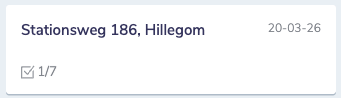Handmatige volgorde:** Je kunt projecten eenvoudig zelf sorteren door ze binnen de lijst naar de gewenste positie te slepen. Zo bepaal je handmatig de volgorde op basis van de datum die je rechts ziet staan.
### Sorteren met de Add-on Werkbon & Docs
Maak je gebruik van de module **Werkbon & Docs**? Dan heb je meer mogelijkheden om je overzicht te organiseren via projectnummers:
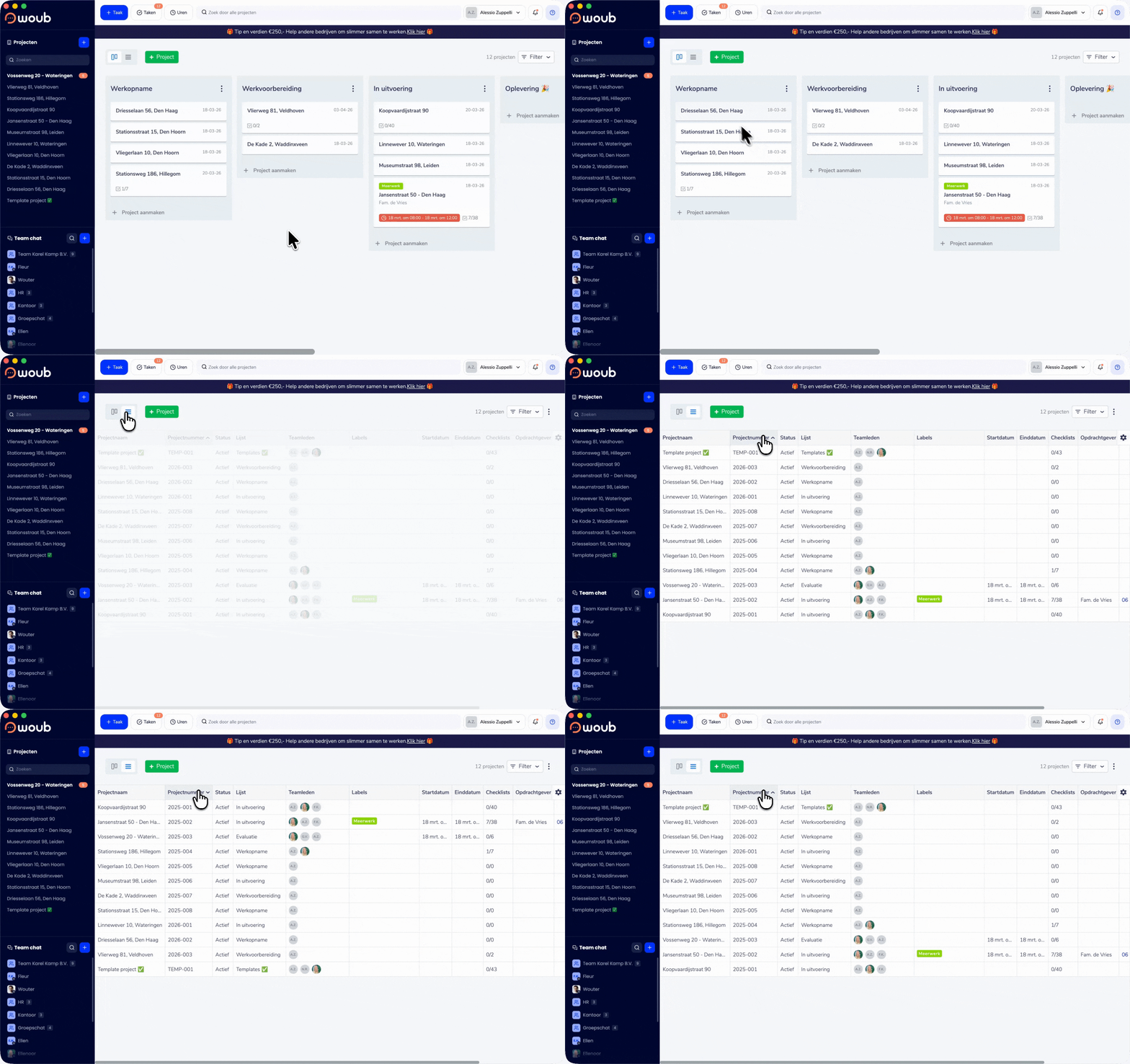
1. **Projectnummers instellen:** Door een automatisch projectnummer in te stellen, krijgt elk nieuw project een uniek, opvolgend nummer. Lees hier [hoe je een automatisch projectnummer instelt](https://help.woub.nl/nl/hoe-stel-ik-een-automatisch-projectnummer-in?hsLang=nl).
2. **Filteren in de lijstweergave:** In de lijstweergave van je projectoverzicht kun je op de kolomtitels klikken.
3. **Oplopend of aflopend:** Selecteer de kolom met projectnummers om deze op- of aflopend te sorteren. Omdat de nummers opeenvolgend zijn, staan je projecten hiermee direct op volgorde van aanmaak.
> **Tip:** Het gebruik van projectnummers is de snelste manier om in grote lijsten direct het meest recente werk bovenaan te krijgen.
- [Nieuwe mobiele app](https://help.woub.nl/nl/nieuwe-mobiele-app?hsLang=nl#main-content)
- [Veelgestelde vragen](https://help.woub.nl/nl/nieuwe-mobiele-app?hsLang=nl#veelgestelde-vragen)
- [Home](https://help.woub.nl/nl/nieuwe-mobiele-app?hsLang=nl#home)
- [Projecten](https://help.woub.nl/nl/nieuwe-mobiele-app?hsLang=nl#projecten)
- [Chat](https://help.woub.nl/nl/nieuwe-mobiele-app?hsLang=nl#chat)
- [Taken](https://help.woub.nl/nl/nieuwe-mobiele-app?hsLang=nl#taken)
- [Account](https://help.woub.nl/nl/nieuwe-mobiele-app?hsLang=nl#account)
- [Notificaties](https://help.woub.nl/nl/nieuwe-mobiele-app?hsLang=nl#notificaties)
- [Bellen](https://help.woub.nl/nl/nieuwe-mobiele-app?hsLang=nl#bellen)
- [Binnen 5 minuten staat de basis](https://help.woub.nl/nl/binnen-5-minuten-staat-de-basis?hsLang=nl)
- [Starten met Woub](https://help.woub.nl/nl/starten-met-woub?hsLang=nl)
- [Veelgestelde vragen](https://help.woub.nl/nl/veelgestelde-vragen?hsLang=nl#main-content)
- [Chats](https://help.woub.nl/nl/veelgestelde-vragen?hsLang=nl#chats)
- [Taken](https://help.woub.nl/nl/veelgestelde-vragen?hsLang=nl#taken)
- [Gebruikersgroepen - Rollen en rechten](https://help.woub.nl/nl/veelgestelde-vragen?hsLang=nl#gebruikersgroepen-rollen-en-rechten)
- [Algemene instellingen](https://help.woub.nl/nl/veelgestelde-vragen?hsLang=nl#algemene-instellingen)
- [Project](https://help.woub.nl/nl/veelgestelde-vragen?hsLang=nl#project)
- [Account](https://help.woub.nl/nl/veelgestelde-vragen?hsLang=nl#account)
- [Checklist](https://help.woub.nl/nl/veelgestelde-vragen?hsLang=nl#checklist)
- [Externe deelnemers](https://help.woub.nl/nl/veelgestelde-vragen?hsLang=nl#externe-deelnemers)
- [Add-ons](https://help.woub.nl/nl/add-ons?hsLang=nl#main-content)
- [Projectoverzicht](https://help.woub.nl/nl/add-ons?hsLang=nl#projectoverzicht)
- [Planning](https://help.woub.nl/nl/add-ons?hsLang=nl#planning)
- [Uren & materialen](https://help.woub.nl/nl/add-ons?hsLang=nl#uren-materialen)
- [Werkbon & docs](https://help.woub.nl/nl/add-ons?hsLang=nl#werkbon-docs)
- [Woub Translate](https://help.woub.nl/nl/add-ons?hsLang=nl#woub-translate)
- [Formulieren](https://help.woub.nl/nl/add-ons?hsLang=nl#formulieren)
- [Integraties](https://help.woub.nl/nl/integraties?hsLang=nl#main-content)
- [Sharepoint](https://help.woub.nl/nl/integraties?hsLang=nl#sharepoint)
- [Moneybird](https://help.woub.nl/nl/integraties?hsLang=nl#moneybird)
- [Exact Online](https://help.woub.nl/nl/integraties?hsLang=nl#exact-online)
- [Exact Online Projecten](https://help.woub.nl/nl/integraties?hsLang=nl#exact-online-projecten)
- [Ed Controls](https://help.woub.nl/nl/integraties?hsLang=nl#ed-controls)
- [Persoonlijke voorkeuren](https://help.woub.nl/nl/persoonlijke-voorkeuren?hsLang=nl#main-content)
- [Agenda synchronisatie](https://help.woub.nl/nl/persoonlijke-voorkeuren?hsLang=nl#agenda-synchronisatie)
- [Changelog](https://help.woub.nl/nl/changelog?hsLang=nl)
[](https://woub.nl)