---
title: Hoe vind ik mijn gearchiveerde projecten terug?
description: Vind eenvoudig gearchiveerde projecten terug in Woub via de zoekfunctie. Zoek door alle projecten, inclusief gearchiveerde, om snel de juiste informatie te vinden.
---
[Overslaan naar inhoud](https://help.woub.nl/nl/hoe-vind-ik-mijn-gearchiveerde-projecten-terug#main-content)
[](https://help.woub.nl/nl?hsLang=nl)
Hoofdnavigatie openen
Hoofdnavigatie sluiten
- [Neem contact met ons op](https://woub.nl/contact-ons/)
[Neem contact met ons op](https://woub.nl/contact-ons/)
Hallo, hoe kunnen wij jou helpen?
- Er zijn geen suggesties want het zoekveld is leeg.
1. [Kennisbank Woub](https://help.woub.nl/nl?hsLang=nl)
2. [Veelgestelde vragen](https://help.woub.nl/nl/veelgestelde-vragen?hsLang=nl)
3. [Project](https://help.woub.nl/nl/veelgestelde-vragen?hsLang=nl#project)
# Hoe vind ik mijn gearchiveerde projecten terug?
Je kunt je gearchiveerde projecten gemakkelijk terugvinden via de **zoekfunctie** in Woub.
[](https://downloads.intercomcdn.com/i/o/au311ala/1476976650/4b6abee5cbe2e9d9d79cb54cc215/Projecten_zoeken_woub.png?expires=1757116800&signature=c887b3b70b3ac939edf5ff42b6fa5b09fc8ca03551b315cf128f68ba5b801f3a&req=dSQgEMB5m4daWfMW3nq%2BgUt3ITurqBP8GTJnpw2ol9LL2bPNs2NkEtquunoR%0AowyVJoFxSEO4uFJ7HWjse2LT%2FpE%3D%0A)
Bovenaan je scherm staat de optie **'Zoeken door alle projecten'**. Hier kun je zoeken door **alle projecten**, inclusief de **gearchiveerde projecten.**
Gearchiveerde projecten zijn ook terug te vinden via het 'Projectenoverzicht'. Selecteer hiervoor de lijstweergave en zoek dan in de 'Gearchiveerde projecten' filter.

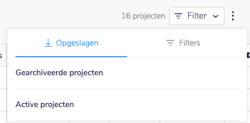
Heb je geen projectenoverzicht? Kijk dan of je de add-on aan hebt staan. Deze is gratis te installeren via '**Hallo (naam) \> Integraties & apps \> Projectenoverzicht.'**
- [Nieuwe mobiele app](https://help.woub.nl/nl/nieuwe-mobiele-app?hsLang=nl#main-content)
- [Veelgestelde vragen](https://help.woub.nl/nl/nieuwe-mobiele-app?hsLang=nl#veelgestelde-vragen)
- [Home](https://help.woub.nl/nl/nieuwe-mobiele-app?hsLang=nl#home)
- [Projecten](https://help.woub.nl/nl/nieuwe-mobiele-app?hsLang=nl#projecten)
- [Chat](https://help.woub.nl/nl/nieuwe-mobiele-app?hsLang=nl#chat)
- [Taken](https://help.woub.nl/nl/nieuwe-mobiele-app?hsLang=nl#taken)
- [Account](https://help.woub.nl/nl/nieuwe-mobiele-app?hsLang=nl#account)
- [Notificaties](https://help.woub.nl/nl/nieuwe-mobiele-app?hsLang=nl#notificaties)
- [Bellen](https://help.woub.nl/nl/nieuwe-mobiele-app?hsLang=nl#bellen)
- [Binnen 5 minuten staat de basis](https://help.woub.nl/nl/binnen-5-minuten-staat-de-basis?hsLang=nl)
- [Starten met Woub](https://help.woub.nl/nl/starten-met-woub?hsLang=nl)
- [Veelgestelde vragen](https://help.woub.nl/nl/veelgestelde-vragen?hsLang=nl#main-content)
- [Chats](https://help.woub.nl/nl/veelgestelde-vragen?hsLang=nl#chats)
- [Taken](https://help.woub.nl/nl/veelgestelde-vragen?hsLang=nl#taken)
- [Gebruikersgroepen - Rollen en rechten](https://help.woub.nl/nl/veelgestelde-vragen?hsLang=nl#gebruikersgroepen-rollen-en-rechten)
- [Algemene instellingen](https://help.woub.nl/nl/veelgestelde-vragen?hsLang=nl#algemene-instellingen)
- [Project](https://help.woub.nl/nl/veelgestelde-vragen?hsLang=nl#project)
- [Account](https://help.woub.nl/nl/veelgestelde-vragen?hsLang=nl#account)
- [Checklist](https://help.woub.nl/nl/veelgestelde-vragen?hsLang=nl#checklist)
- [Externe deelnemers](https://help.woub.nl/nl/veelgestelde-vragen?hsLang=nl#externe-deelnemers)
- [Add-ons](https://help.woub.nl/nl/add-ons?hsLang=nl#main-content)
- [Projectoverzicht](https://help.woub.nl/nl/add-ons?hsLang=nl#projectoverzicht)
- [Planning](https://help.woub.nl/nl/add-ons?hsLang=nl#planning)
- [Uren & materialen](https://help.woub.nl/nl/add-ons?hsLang=nl#uren-materialen)
- [Werkbon & docs](https://help.woub.nl/nl/add-ons?hsLang=nl#werkbon-docs)
- [Woub Translate](https://help.woub.nl/nl/add-ons?hsLang=nl#woub-translate)
- [Formulieren](https://help.woub.nl/nl/add-ons?hsLang=nl#formulieren)
- [Integraties](https://help.woub.nl/nl/integraties?hsLang=nl#main-content)
- [Sharepoint](https://help.woub.nl/nl/integraties?hsLang=nl#sharepoint)
- [Moneybird](https://help.woub.nl/nl/integraties?hsLang=nl#moneybird)
- [Exact Online](https://help.woub.nl/nl/integraties?hsLang=nl#exact-online)
- [Exact Online Projecten](https://help.woub.nl/nl/integraties?hsLang=nl#exact-online-projecten)
- [Ed Controls](https://help.woub.nl/nl/integraties?hsLang=nl#ed-controls)
- [Persoonlijke voorkeuren](https://help.woub.nl/nl/persoonlijke-voorkeuren?hsLang=nl#main-content)
- [Agenda synchronisatie](https://help.woub.nl/nl/persoonlijke-voorkeuren?hsLang=nl#agenda-synchronisatie)
- [Changelog](https://help.woub.nl/nl/changelog?hsLang=nl)
[](https://woub.nl)